Structuring and constructing modules part 1: Initialization
Let’s start on how to construct a module preliminarily. To demonstrate how to write modules, let’s work with an example folder named ./module/. Each script or subfolder within this directory will serve as a separate module (or even a submodule). In this guide, the files under ./module are expected to be empty, or visit ./module that contains the source code to view the pre-written code.
The structure
{box} modules, just like any modules from other programming languages, can go deeper. This is totally different from R where all the source R codes are placed under a flat R/ structure. Here’s the structure of the ./module folder to be initialize:
module/
├── __init__.r
├── convert.r
├── hello_world.r
├── matrix_ops.r
├── not_func.r
├── tables.r
└── statistics/
    ├── __init__.r
    ├── cor.r
    ├── corrr.r
    ├── time_series.r
    └── models/
        ├── __init__.r
        ├── linear.r
        ├── logistic.r
        └── baseline_logit.r
Observe that it has 2 levels deep nested modules, and it still can have multiple subdirectories inside module/. Once again, it can go deeper than 2 levels for each subdirectory. This is how module system should look like.
Initialization
The __init__.r file is a special file, acts as the initialization file which marks ./module folder as a “package”, in which will be executed once you import ./module as a module. Once you have it, it is really beneficial because once you declare exports under __init__.r, that folder now acts like a module itself and you don’t need to explicitly load the script as modules, repetitively. This __init__.r file feels too familiar to you when you came from Python.
Since you have __init__.r as an entry point, you load or expose specific functions or objects out from the submodules within this folder. You’ll be always using this special file to treat folders as modules, equivalent to what made Python modules.
Every folder at every level that you want to treat as a module must contain an __init__.r file. This applies to the (1) root module folder (module/), (2) any subfolders (statistics/), or even any nested subfolders (statistics/models/). Without __init__.r, {box} won’t recognize the folder as a module.
Scripts from root folder
The root module/ folder contains few (if not several) scripts that can be directly imported:
hello_world.r: A simple demonstration script using examples from the official{box}documentation. This showcases basic module functionality and serves as a “Hello World” introduction to module creation.convert.r: Contains utility functions for temperature conversion:celsius_to_fahrenheit(): Converts Celsius to Fahrenheitfahrenheit_to_celsius(): Converts Fahrenheit to Celsius
These functions demonstrate how standalone utility functions can be organized in modules.
matrix_ops.r: Comprises with overloaded matrix operation functions and operators:- Custom matrix multiplication operators
- Matrix transformation utilities
This script demonstrates how to export functions with special characters (operators like
*or^).tables.r: Contains table formatting and display functions:
- `draw_table()`: Displays data frames as table in terminal.not_func.r: Contains the exports that are not functions. This simply demonstrates that modules aren’t limited to functions. This script contains various data structures that can be exported:- Atomic vectors
- Lists
- Matrices
- Data frames
- N-dimensional arrays
- Constants or configuration values
This shows that any R object can be part of a module’s namespace, not just functions.
Subfolders (Submodules)
The module structure includes organized subfolders that group related functionality:
Statistical Analysis Submodule statistics/
A subfolder dedicated to contain statistical functions. When imported, this becomes the {statistics} submodule. Subfolders like this help categorically group related functionalities within a larger module structure.
__init__.r: Always the required initialization file, if you want to markstatistics/as a submodule and controls which functions or scripts are exposed when someone imports the statistics module. Without this file, the folder cannot function as a module.cor.r: Contains basic correlation functions:- Simple correlation coefficient calculations
- Demonstrates fundamental statistical operations
corrr.r: An extended correlation module that builds oncor.r:- Depends on
stats::cor()for computation - Uses
{tidyverse}APIs for data manipulation - Includes nonparametric correlation methods (Spearman, Kendall)
- Shows how modules can have dependencies on other modules and packages
- Depends on
time_series.r: Contains time series analysis functions:- Moving averages
- Trend analysis
- Seasonal decomposition
- Other time series utilities
Groups all time series functionality under one module for easy access.
Statistical modelling nested submodule statistics/models/
A nested subfolder (two levels deep) for organizing machine learning and statistical modeling functions. This demonstrates {box}’s support for hierarchical module organization.
__init__.r: Even though this folder is nested inside another module, it still needs its own__init__.rto be recognized as a submodule.linear.r: Linear regression functions.logistic.r: Logistic regression functions
Notice how models/ is nested inside statistics/, creating a hierarchy:
module/(root)statistics/(submodule)models/(nested submodule)
Each level requires its own __init__.r file. This organization allows you to access functions like:
module$statistics$models$linear$fit_regression()Or with aliases:
lm_models$fit_regression()
Importing {./module}
Now that you’ve seen the structure of the ./module folder, you may want to reuse the codes under ./module, by forking ./module, found at the source code of this book, into any specified directory. Let’s recall what is on about throughout Chapter 2: Fundamentals of import system in {box} package. In this example, we are importing scripts / folders from ./module folder, as modules instead.
Valid imports
Here are the valid imports:
With alias
box::use(
    md = ./module
)
Note: It’s up to you if you want another name, besides
md.Without alias
box::use(
    ./module
)
Load specific subfolder as a module
box::use(
    md_stats = ./module[statistics]
)
This is equivalent to:
box::use(
    md_stats = ./module/statistics
)
As long as the
statistics/subfolder is publicly exported under the initialization__init__.rfile.Load specific script as a module
box::use(
    md_dt = ./module[not_func]
)
Note: This is not entirely equivalent to:
box::use(
    md_dt = ./module/not_func
)
Here,
md_dtis loaded as a module that carries the whole./modulefolder, not thenot_funcscript. On the other hand, the second code will loadnot_funcscript as a module undermd_dtname.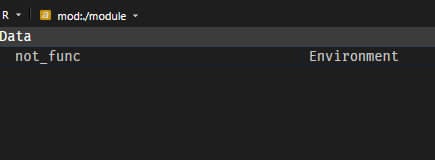
Do not forget to put ./ prefix to load specific local modules in your own workspace. The lack of ./ prefix is only valid for R packages. For the deep nested modules, this will be deeply tackled in Chapter 3.4: Accessing modules in any depths.
Reloading modules
As discussed on Chapter 2, there are times you need to reload the module, only during the development and in an interactive session, most particularly when you import a particular module then you modify its source code. However, {box} modules are cached after their first import. This means that changes you make to your module’s code won’t automatically take effect until you explicitly reload it.
Basic Reloading
To reload a module, {box} provides the function box::reload(). This clears the cached version and re-imports the module, ensuring that the latest code changes are applied.
If you’ve imported the module, such as:
box::use(
    md = ./module
)
and you made some changes within its source code, you can reload it simply by:
box::reload(md)And note: Reloading submodules under md module is not valid, even though statistics here is a module.
# Bad
box::reload(md$statistics)

# Good
box::reload(md)